POS, QR menu and booking for your venue
A POS for the floor, a QR menu with ordering right at the table, online table booking and a kitchen order screen. A ready service for cafes and restaurants — in minutes.
the menu opens on the phone
the order flies to the kitchen
order screen, no paper tickets
the POS totals the bill
Restaurant & cafe POS software — everything it does
A ready-made cafe POS with a QR menu: your own website, self-ordering from the table, reservations and a dish catalog — out of the box, in Ukrainian. Simpler than Poster or iiko if you have a single venue. Click any screen to take a closer look.
Your own venue website with reservations
Right after purchase the venue gets a ready website under its own brand: the menu, the atmosphere and a table-reservation button on the homepage. No separate builder or developer needed — the site works from day one.
- Your logo, colors and menu
- Table reservations from the homepage
- Responsive on phone and tablet
QR menu — the guest orders from the table
The guest scans the QR at the table and orders from their phone — categories, dish photos and prices, and the order flies straight to the kitchen. Fewer queues at the till and less load on waiters at peak.
- Menu with photos and prices on the guest phone
- Order goes straight to the kitchen screen
- No paper receipts or mix-ups
Online table reservations
The guest picks a date and a free time right on the site — instant confirmation, no calls during working hours. You see the dining-room load in advance and do not lose guests on busy evenings.
- Reservations with no calls
- Dining-room load visible in advance
- Guest confirmation and reminders
Dish catalog with prices and modifiers
A handy dish catalog by category with prices and modifiers — you can update the menu or add a seasonal dish in a few minutes, without calling a contractor or reprinting a paper menu.
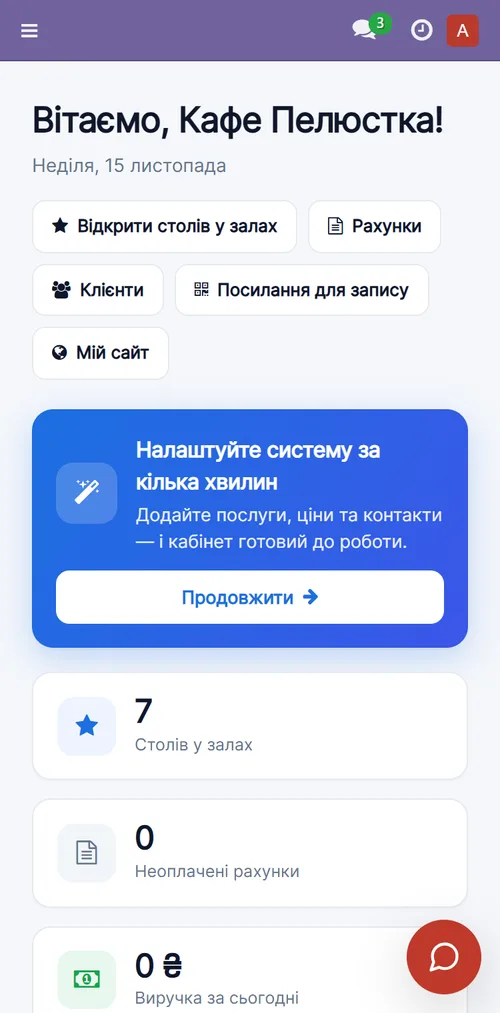
Venue dashboard: tables, revenue and reservations together
Every morning the host sees what matters: how many tables are in the rooms, revenue for the day, unpaid bills and the workload for the week. All on one screen, no notebook by the till.
- Tables by room (terrace, main hall)
- Revenue and unpaid bills for the day
- Workload for 7 days
A menu with photos and prices that updates in minutes
Every dish is a card with a photo, a name and a price, grouped by category. You can add a seasonal item, change a price or remove a dish yourself in minutes — the same menu instantly works in the QR and at the till.
- Dish cards with photos and prices
- Grouped by category
- One menu for QR, till and site
Ready to work on day one
Three things included in every plan at no extra cost. Here is how they work in this product.
Set up in 10 minutes, no manual needed
Tables for reservations and a menu with prices are already suggested. QR menus on the tables and the register work from day one.
Answers clients and helps your team
Answers guests about the menu, opening hours and table reservations. Your host isn't pulled away by calls during the rush.
Works out of the box on a free model with a daily limit. Connect your own model (Claude, ChatGPT, Gemini) at any time.
Your back office as an icon on the phone
The host opens the app from its icon: floor, reservations and orders on a phone, even when away from the register.
No App Store or Google Play: tap “Install” in the browser and your icon with your name appears on the screen.
A system that works for your business
One simple plan
No hidden fees, no lock-in. Your data is yours, export anytime. Core updates arrive automatically. Fiscalization (pRRO via Checkbox/Vchasno) and online delivery are available as extensions.
- ✓ A POS for the floor with tables
- ✓ A QR menu with self-ordering
- ✓ Online table booking
- ✓ A kitchen order screen
- ✓ Venue website, services (banquet/catering), cabinet
- ✓ Automatic deployment and updates
Frequently asked questions
How does the QR menu work?
Every table has a QR code. The guest scans it, sees your menu and places the order themselves; it goes to the kitchen and the POS.
Is there fiscalization (pRRO)?
Fiscal receipts (pRRO) connect as an extension via Ukrainian services (Checkbox/Vchasno). The base service runs orders and the POS.
How long does setup take?
A few minutes. After payment the service deploys automatically; then you fill the menu and print QR codes for the tables.
Can tables be booked?
Yes — guests book a table right from your website, and you see the floor load and confirm the booking.
Launch a modern cafe today
14 days free. Then 690 ₴/mo, cancel anytime.